
How to Register in the CitizenServe Online Portal
Registration applications for Public Infrastructure Contractor Registration are submitted via the online permitting portal, Citizenserve.
The portal can be accessed on a PC or mobile device via this website.
You will be required to create an account before applying for registration.
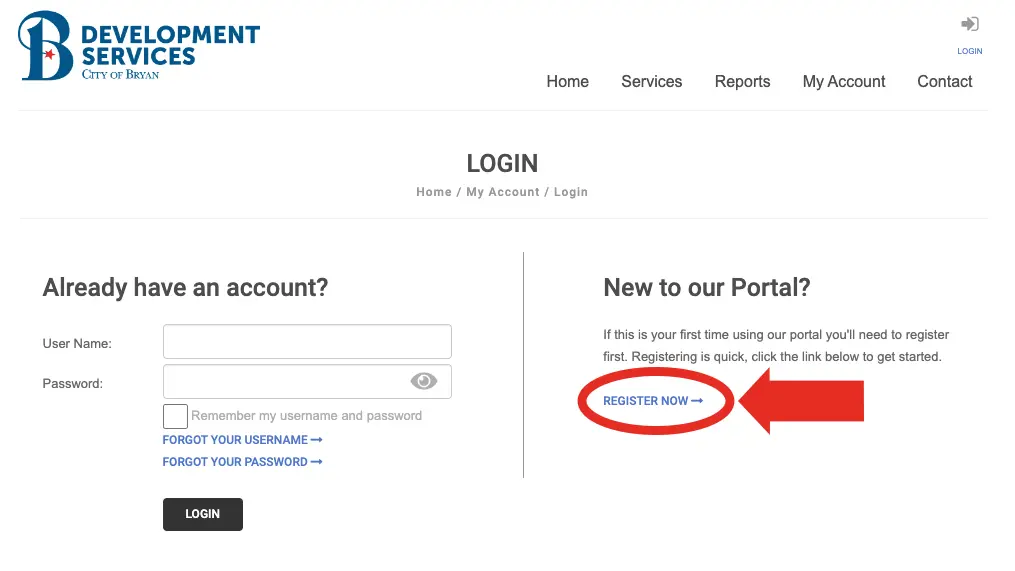
To create an account, please select “Login” at the top right of the screen. On the Login screen you will select “Register Now” as shown below, and fill out the requested information.
After creating an account on the portal, you will be redirected to your account home page.
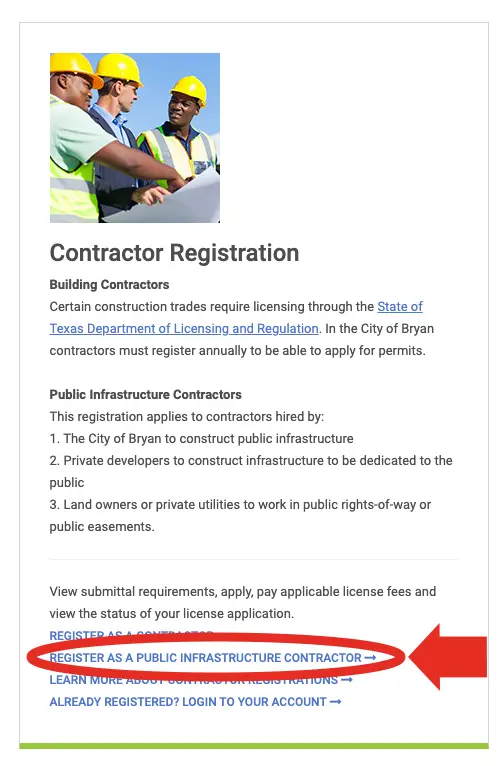
From your account home page you will then navigate to the section titled “Contractor Registration” and select “Register as a Public Infrastructure Contractor” as shown, circled in red, in the example on the right.
From the sub-type drop down menu, select the registration class that most closely relates to the type of work you wish to perform. Detailed descriptions of each registration class can be found here.
If you have questions or would like additional information please visit the links below:
For additional information about the online permitting portal, Citizenserve, and the services offered within, please visit the link below:
If you have any questions regarding the registration process or need assistance with accessing the Citizenserve portal, please contact Katelyn Lilly by email at klilly@bryantx.gov or by phone at 979-209-5030.
Contact Us
Phone: 979-209-5030
Fax: 979-209-5035
Location
Development Center
200 E. 29th St., Bryan, TX 77803
Hours
Monday-Friday:
8 a.m. – 5 p.m.